Python Lists

Lists are the commonly used data structure in Python, that allows you to store a collection of items, which can be of different data types in a single variable. Lists act like a dynamic array, which means you can add more elements when required.
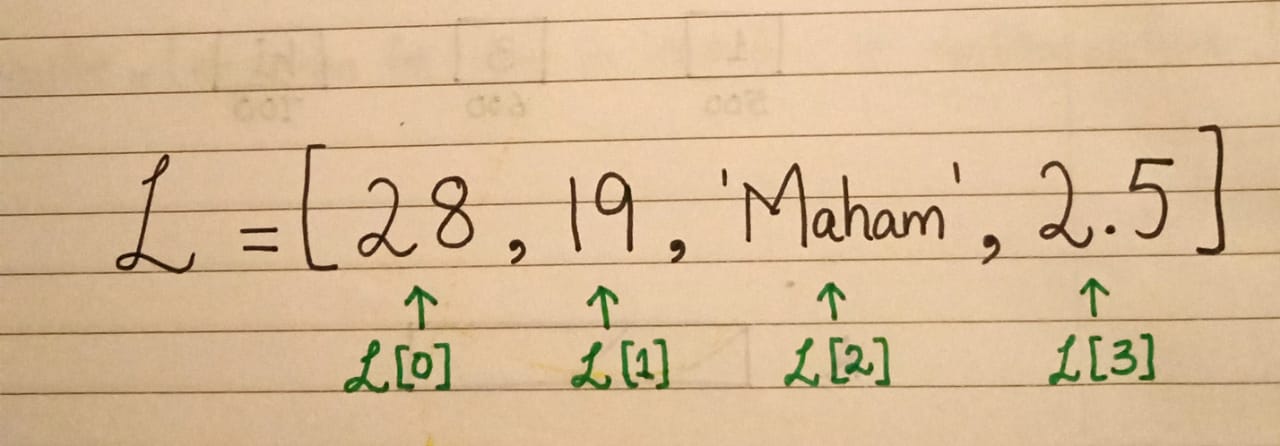
Memory management of Python Lists
Python lists are stored in memory as dynamic arrays. They provide flexibility to grow or shrink dynamically as elements are added or removed. Suppose, we want to store L = [ 1, 3, 'hi' ] in memory. The address of each element is stored in the contagious blocks of memory. This address is also termed a referential array or pointer. The advantage of this scheme is that we can store different data types in a list.
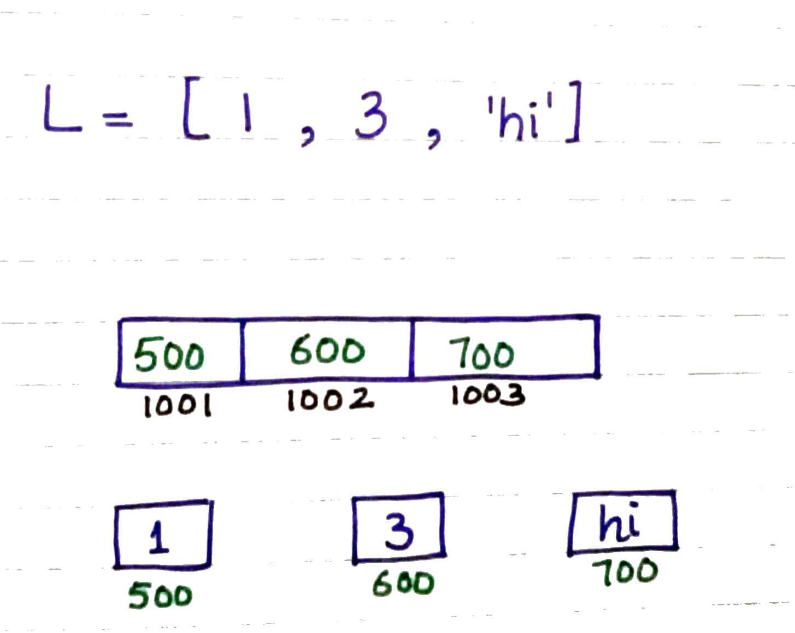
The convenience of lists comes up with the cost of execution speed and extra memory. Suppose, we want to add more elements in L = [ 1, 3, 'hi' ], as lists are implemented as dynamic arrays, it creates an array of almost double the size to accommodate more elements and copies the address of elements to the new array. In this way execution time is increased and memory is over-allocated.
Creating a List
# Empty list
L = []
# Using Type conversion
L1 = list ('hello')
L2 = [1,2,3,'hi']
print(L1)
print(L2)
# Output:
# ['h','e','l','l','o']
# [1,2,3,'hi']
Characteristics of Python Lists
Lists are ordered, which means that elements are stored in a specific order and this order is preserved when an element is accessed.
  L = [1,2,3]
  L1 = [3,2,1]
  # Items are same, but order is different
  L == L1

  # Output:
  # False
Lists are mutable data structures, which means we can edit the elements in the list, add new values or remove elements from the list.
  L = [1,2,3,67,8]
  L[0] = 5
  # Editing with indexing
  print(L)
  # Editing with slicing
  L[1:4] = [200, 300, 400]
  print(L)

  # Output:
  # [5,2,3]
  # [1,200,300,400,8]
Lists can both be heterogenous and homogenous.
  # Heterogenous lists
  L = [1, 2 ,3 ,'hello']

  # Three elements in the list are integers and other is list
  L = [1,2,3, [5,5]]

  # Homogenous lists
  L = [True,False]
  L = ['hi', 'hello','salam']
The list can have duplicate elements in it.
  # Valid list
  L = [1,2,3,4,5,2,1]
Elements in the can be accessed through indexing and slicing.
  # Indexing (Positive & Negative)
  L = [7,8,9,6,5]

  # Accessing third element in list
  print(L[2])
  # Accessing second element from the last
  print(L[-2])
  # Output:
  # 9
  # 6

  # Slicing
  print (L[0:3])
  # traversing the list with step size of 1
  print (L[0::2])
  # Output:
  # [7, 8, 9]
  # [7, 9, 5]
Lists can be nested.
  # 2D list
  L = [1,2,3,4,[6,7]]

  # Suppose we want to extract 6 from the list
  print(L[4][0]) # positive indexing ,output : 6
  print(L[-1][-2]) # negative indexing , output:6

  # 3D list
  L = [[[1,2],[3,4]], [[5,6],[7,8]]]

  # Suppose we want to extract 7 from 3D list
  print(L[1][1][0]) # positive indexing, output : 7
  print(L[-1][-1][-2]) # negative indexing, output :7
Adding Elements in a List
Adding elements using the append method. This method will add a single item at a time at the end.
 L = [1,2,3,4]
 L.append('hello')
 print(L)

 # Output:
 # [1, 2, 3, 4, 'hello']
Adding multiple elements at a time using the extend method.
 L = [1,2,3,4]
 L.extend('hello')
 print(L)

 # Output:
 # L = [1, 2, 3, 4, 'h', 'e', 'l', 'l', 'o']
Adding element at a desired position using the insert method. We need to provide an element and index location to insert method
list.insert(index, element).L = [1,2,3,4,5] L.insert(1, 100) print(L) # Output: # [1, 100, 2, 3, 4, 5]
Deleting items from a List
Elements in a list can be deleted using del keyword through indexing or slicing
 L = [1, 2, 3, 4, 5]

 #indexing
 del L[1]
 print(L) # Output : [1, 3, 4, 5]

 #slicing
 L = [1, 2, 3, 4, 5]
 del L[2:4]
 print(L) # Output: [1, 2, 5]
Elements in a list can also be removed using the remove function. This function is used when data is dynamically generated and the index position is not known.
 L = [1, 2 , 3, 4, 5]
 # Remove 5 from the list
 L.remove(5)
 print(L)

 # Output:
 # [1, 2 , 3, 4, 5]
Elements in a list can be removed using pop() function
 L = [1, 2, 3, 4, 5]

 # Delete second element from the list
 L.pop(1)
 print(L)
 # Output:  [1, 3, 4 , 5]

 # If index is not provided last item will be deleted
 L.pop()
 print(L)
 # Output: [1, 3, 4]
Elements in a list can be cleared using the clear() function. This function will clear all the elements and return an empty list.
 L = [1, 2, 3, 4, 5]
 L.clear()
 print(L)

 # Output: []
Operators on Lists
Arithmetic operators (+, *)
  L1 = [1, 2, 3]
  L2 = [4, 5, 6]

  # Concatenate/ Merge
  print (L1+L2)
  # Output: [1, 2, 3, 4, 5, 6]

  # Multiplication operator
  print (L1*2)
  # Output: [1, 2, 3, 1, 2, 3]
Membership operator (
in,not in)L1 = [1, 2, 4, 5] print (5 in L1) # Output: True L2 = [2, 3, 8, 7, [3,4]] print([3,4] not in L2) # Output : FalseElements in a list can iterated using Loops
  # 1D list
  L1 = [1, 2, 3, 4, 5]
  for i in L1:
      print (i, end =' ')
  # Output : 1 2 3 4 5

  # 2D list
  L2 = [1, 2, [4, 5]]
  for i in L2:
      print(i,end = ' ')
  # Output: 1 2 [4, 5]

  # 3D list
  L3 = [[[1,2], [3, 4]]]
  for i in L3:
      print(i,end = ' ')
  # Output: [[1, 2], [3, 4]]
There are two ways to traverse the lists using loops
  L = [1, 2, 3, 'hello']

  # itemwise
  for i in L:
      print(L)

  # Output:
  # 1
  # 2
  # 3
  # hello

  # indexwise
  for i in range(0,len(L)):
      print(L[i])

  # Output:
  # 1
  # 2
  # 3
  # hello
List Functions
L = [1, 2, 4, 1]

# len() ---> 3
print (len(L))

# min() ---> 1
print(min(L))

# max() ---> 4
print(max(L))

# sorted() ---> [4, 2 ,1, 1]
print(sorted(L,reverse = True)) # set reverse = True, if we want to sort in descending order

# count() ---> 2
L.count(1)

# index() ---> retuns the index of element (1)
L.index(2)

# copy() ---> create a shallow copy of list [1, 2, 4, 1] in memory
L1 = L.copy()
print (L1)

# reverse() ---> permanantly reverses the  original list [1,4, 2 ,1]
L.reverse()
print(L)

# sort() ---> permanatly sort the original list
L = [5,21,2,3,1]
L.sort()
print(L) # [1, 2, 3, 5, 21]
List Comprehension
List comprehension is a concise and powerful way to create new lists in Python.
The basic syntax of list comprehension is :

Examples:
Add 1 to 10 numbers in a list using List comprehension
 L = [i for i in range(1,11)]
 print(L)
 # Output : [1, 2, 3, 4, 5, 6, 7, 8, 9, 10]
Create a List with square numbers
 L = [1, 2, 3, 4, 5]
 L1 = [i**2 for i in L]
 print(L1)

 # Output: [1, 4, 9, 16, 25]
Print all numbers that are divisible by 5 in the range of 1 to 30
 L = [i for i in range(1,30) if i % 5 == 0]
 print(L)

 # Output:
 # [5, 10, 15, 20, 25]
Find languages that start with the letter 'j'
 languages = ['java','python', 'c#', 'javascript', 'kotlin']
 [i for i in languages if i.startswith('j')]

 # Output:
 # ['java', 'javascript']
Print a (3,3) matrix using list comprehension (nested list comprehension)
 [[i*j for i in range(1,4)] for j in range(1,4)]

 # Output:
 # [[1, 2, 3], [2, 4, 6], [3, 6, 9]]
Zip() Function
The zip() function in Python is used to combine two or more iterables such as the List, tuples or other sequences) element-wise to create a new iterable. The corresponding items in each iterables are paired together. If the passed iterators have different lengths, the iterator with the least item decides the length of the new iterator.
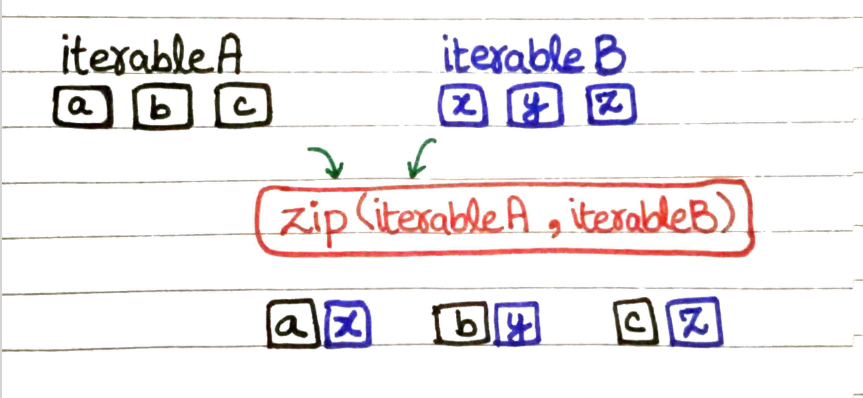
names = ['Amna', 'Sana', 'Maham']
scores = [80, 90, 100]

zipped_data = zip(names, scores)

for name,score in zipped_data:
    print(name, score)

# Output: Amna 80
#         Sana 90
#         Maham 100
# Add corresponding items in lists
L1 = [1, 2 ,3 , 4]
L2 = [1, 4, 9 , 8]

L3 = [i+j for i,j in zip(L1,L2)]
print(L3)

# Output : [2, 6, 12, 12]