Strings in Python

Background
In 1968, the American Standard Code for Information Interchange or ASCII was a standard system to define numeric codes for various characters, ranging from 0 to 127. However, ASCII does not define the accented characters such as in French e' or I', which means it is not suitable for other languages. To alleviate this problem, Unicode encoding was introduced which holds a vast range of characters from different writing systems. It allows the representation of characters from different languages, special characters (_,@,/...)and other symbols.
Strings are immutable sequences of Unicode characters that are used to represent textual data. Python supports various types of string literals including both ASCII and Unicode encoding. Unicode strings in Python are denoted by 'u' prefix before the string literal and ASCII strings can be represented without special prefixes. However, since Python3 versions, all strings are Unicode by default. So, it is not necessary to explicitly specify. Python provides several built-in methods and operations for string manipulation.
string = u'Hello world !' # unicode string
Creating Strings
Strings in Python are created using single, double or triple quotes depending upon the characters in strings.
# Strings with double quotes
string = 'He said, "python is awsome"'
string = "He said,\"python is awesome\" "

# Strings with single quote
string = "It's a beautiful day"
string = 'It\'s a beautiful day'

# This syntax is used for multiline strings
string = '''This is the
multi line string '''

# String definition using escape sequence character such as \n (newline), \\ (backlash) or \t (tab)
string = "This is a string with escape sequences:\nNewline after this.\n"

# creating string using str function
string = str ('hello')
Indexing
Python assigned an index to each of the characters. This is also called the positive indexing. However, Python is flexible as it also provides the option of negative indexing. This syntax is useful when we want to access the characters from the end without knowing the length of the string.
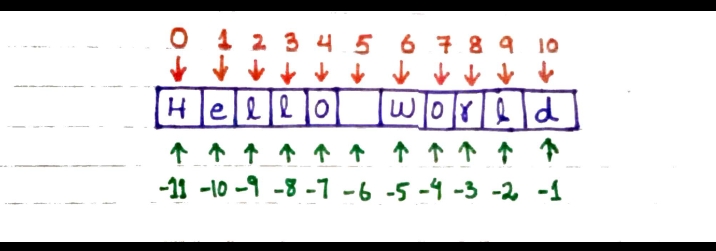
sting = "Hello World"
print(string[3])  # Access index [3]
print(string[-3]) # Acees index [-3]

# Output:
# l
# r
Slicing
We can extract multiple portions of strings using slicing.
string = "Hello World"
print(string[1:4])  # Access substring (ell)
print(string[-10:-7]) # Access substring (ell) using negative indexing

# Output:
# ell
# ell
Editing and deleting Strings
String are immutable data types, which means once it is created, its content cannot be changed. However, Python provides a range of string manipulation methods to create new strings with the desired modifications.
sting = "Hello World"
string[0] = 'h' # change H with h

# Output:
# TypeError
Similarly, if we want to delete some portion of the string, an error will be thrown. So, we need to delete the entire string.
string = 'Hello World'
del s
string = "Hello World"
del string[-5:-5] # delete the substring

# Output:
# typeError
Operations on Strings
Arithmetic operations
string1 = "Hello"
string2 = "World"
print(string1 + ' ' + string2) # concatenate two strings
print(string1*3) # prints the string 3 times

# Output:
# Hello World
# HelloHelloHello
Relational operations
All relational operators can be applied to strings.
'cat' == 'cat' # returns True
'cat'!= 'Cat' # returns false
'cat' > 'dog' # checks the string lexicographically ,returns False
Logical operations
'hello' and 'world'
' ' and 'Cat' # returns false (empty string as false)
' ' or 'cat' # returns cat

# Output:
# world
# Cat
# ' '
Membership operations
text = "Hello, world "
print('world' in text) # returns true
print ('Python' not in text) # returns true

# Output:
# True
# True
Commonly used functions on Strings
len
max
min
sorted
text = "Hello, world "
print(len(text)) # returns the length of string
print(max(text)) # returns w
print(min(text)) # return ' ' (space)
print(sorted(text)) # sort the string

# Output:
# 13
# w
#
# [' ', ' ', ',', 'H', 'd', 'e', 'l', 'l', 'l', 'o', 'o', 'r', 'w']
Capitalize/Title/Upper/Lower/Swapcase
Python provides various methods to manipulate characters in a string. These methods are useful for various tasks, such as formatting, normalization, and presentation of text data in different case styles.
str.capitalize() : This method capitalizes the first character of the string.
 text = "hello, world"
 capitalized_text = text.capitalize()
 print(capitalized_text)

 # Output:
 # Hello, world
str.title() : This method capitalizes the first character of each word in the string.
 text = "hello, world"
 title_case_text = text.title()
 print(title_case_text)

 # Output:
 # Hello, World
str.upper() : This method converts all characters in the string to uppercase.
 text = "Hello, World"
 uppercase_text = text.upper()
 print(uppercase_text)

 # Output:
 # HELLO, WORLD
str.lower() : This method converts all characters in the string to lowercase.
 text = "Hello, World"
 lowercase_text = text.lower()
 print(lowercase_text)

 # Output:
 # hello, world
str.swapcase() : This method swaps the lowercase character to uppercase and vice versa.
 text = "Hello, World"
 swapped_text = text.swapcase()
 print(swapped_text)

 # Output:
 # hELLO, wORLD
Count/Find/Index
text = "Hello, World"
text.count('o') # count the 'o' in string
text.find('o') # returns the index of first occurence of 'o'
text.index('o') # similar to find method except it raises exception if character is not present

# Output:
# 2
# 8
# 8
endswith/startswith
These methods check if a string starts or ends with a specified substring.
text = "Hello, world!"
starts_with_hello = text.startswith("Hello")
print(starts_with_hello)

# Output: True
text = "Hello, world!"
ends_with_world = text.endswith("world!")
print(ends_with_world)

# Output: True
String formatting
name = "Maham"
age = 25
formatted_string = f"My name is {name} and I am {age} years old"
# Alternate syntax
formatted_string = "My name is {0} and I am {1} years old".format(name,age)
isalnum/isalpha/isdigit/isidentifier
 # checks if string is alphanumeric
'maham1233#'.isalnum()
# checks if string is alphabetic
'maham'.isalpha()
 # checks if string is numeric
'123abx'.isdigit()
#checks if given string is valid identifier
'first-name'.isidentifier()

# Output:
# False
# True
# False
# False
Split/Join/Strip/Replace
 # split at each comma
'My name, is maham'.split(',')
 # concatenate the list
' '.join(['My','name','is','maham'])
# strips the leading and trailing spaces
'maham              '.strip()
 # replace the string with given string
'My name is maham'.replace('maham','sana')

# Output:
# ['My name', ' is maham']
# My name is maham
# maham
# My name is sana